

 By size and geography
 By complexity and functional depth
 By implementation time
 By licensing cost


Microsoft Copilot solutions: AI-powered intelligence
With Microsoft Copilot solutions, your teams get AI-powered intelligence exactly where decisions are made. As a dedicated Microsoft partner, we help you implement Copilot across your entire Microsoft environment.

Move beyond the challenges of AI tools that don't reach your workflows

Most organizations aren’t short on AI tools; they’re short on AI that integrates cleanly into existing systems, respects data governance, and reduces the manual work that slows decision-makers down.
- Sales and service teams spend more time logging data than acting on it: CRM records go stale, follow-ups are delayed, and pipeline visibility suffers.
- Finance and operations teams are still building reports manually: reacting to the past rather than planning ahead.
- Custom AI builds stall in IT backlogs: line-of-business teams need automation but have no clear path to deploy intelligent agents quickly.
- AI tools sit outside the workflow: requiring employees to switch context or use systems not connected to their actual records.
- Governance and data security are unclear: organizations are uncertain which AI actions touch sensitive data and whether the necessary controls are in place.
These aren’t AI adoption problems, they’re workflow integration problems. Microsoft Copilot services are designed to solve them from inside your existing Microsoft environment.
Microsoft Copilot solutions: choosing the right Copilot for your organization
Understanding which Copilot solution addresses your business need is where effective deployment starts. Here’s how each one works
Embedded AI inside your business applications
- Summarizes CRM records, surfaces next-best actions in Sales
- Drafts follow-up emails and case responses from conversation data
- Generates period-close narratives and variance explanations in Finance
- Flags supply chain disruptions with AI-suggested mitigation steps
- Included within Dynamics 365 licenses; no separate AI subscription needed

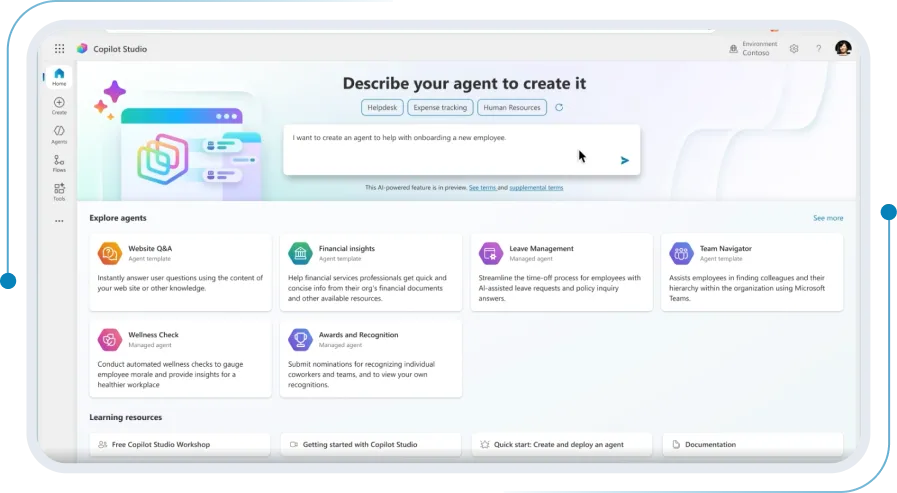
Build, deploy, and manage custom AI agents
- Builds conversational and autonomous agents in natural language — no code
- Grounds agents on SharePoint, Dataverse, and 1,400+ connectors
- Deploys across Teams, websites, Dynamics 365, and external channels
- Governs agent usage and data access via Power Platform admin center
- Requires its own license — pay-as-you-go or Copilot Credits
AI assistance in your productivity apps
- AI writing and summarization in Word, Outlook, and PowerPoint
- Meeting summaries and action item extraction in Teams
- Formula suggestions and data analysis in Excel
- Requires a separate Microsoft 365 Copilot license

Ready to activate Microsoft Copilot in your environment?
Understand where Copilot fits in your business and how to roll it out with the right controls, security, and use cases from day one.

sa.global is recognized with Microsoft Copilot Specialization
The Copilot Specialization is awarded to partners with proven, production-grade experience deploying Microsoft Copilot. sa.global earned this recognition on the strength of approved customer engagements spanning finance operations, vendor management, and self-service support automation.
Key features of Dynamics 365 Copilot
Dynamics 365 Copilot is AI built directly into each Dynamics 365 application, context-aware, action-oriented, and grounded in your actual business data. sa.global activates, configures, and governs Copilot across your full Dynamics 365 estate.

Sales
Summarizes opportunities, drafts emails, surfaces next-best actions from deal history.

Customer Service
Drafts case responses, surfaces knowledge articles, summarizes issues before agents respond.

Finance
Generates period-close narratives, explains variances, surfaces cash flow insights.

Supply Chain
Proactive disruption alerts and AI-generated mitigation suggestions in context.

Project Operations
Generates project status summaries and surfaces margin risks without leaving the record.

Customer Insights
Creates audience segments and generates campaign content using natural language prompts.

Human Resources
Surfaces employee insights and provides AI-assisted answers to HR policy queries.

Sustainability Manager
Accelerates emissions reporting with AI-assisted calculations and workflow automation.
Key features of Microsoft Copilot Studio for enterprise agent deployment
Microsoft Copilot Studio is the enterprise platform for building, managing, and governing AI agents. sa.global scopes, designs, builds, and governs agent deployments that align with your IT and security standards; from scoping workshop to production deployment.
Core platform capabilities
Build
Design agents through a graphical interface or in plain language — no code required
Data
Connect to SharePoint, Dataverse, Dynamics 365, and 1,400+ external connectors
Automate
Build agents that trigger flows, update records, process approvals, and complete multi-step tasks
Deploy
Publish to Teams, SharePoint, Dynamics 365, websites, and external messaging platforms


Microsoft 365 Copilot
Microsoft 365 Copilot brings generative AI into the productivity apps your employees already use meeting summarization in Teams, document drafting in Word, formula assistance in Excel, and email triage in Outlook. It operates on Work IQ, the intelligence layer that understands your organization’s context, people, and content.
FAQs
What is the difference between Dynamics 365 Copilot and Microsoft Copilot Studio?
Dynamics 365 Copilot is AI embedded directly inside Dynamics 365 applications, included with your license. Copilot Studio is a separate platform for building custom AI agents — requiring its own license — used when you need AI beyond what’s pre-built in Dynamics 365.
Does our team need a Microsoft 365 Copilot license to use Dynamics 365 Copilot?
No. Dynamics 365 Copilot is included within Dynamics 365 application licenses. Microsoft 365 Copilot is separate and covers Word, Excel, Teams, and Outlook. sa.global can map which capabilities your current licenses already unlock before you consider additional spend.
How is our business data protected when Copilot generates responses?
Copilot operates within your Microsoft tenant. Your data is not used to train external models. Responses are grounded in your own connected data. Role-based access controls and Microsoft Purview govern every agent interaction.
What does it take to activate Dynamics 365 Copilot across our existing deployment?
Activation depends on your Dynamics 365 version, license tier, and whether your data model is configured for AI grounding. sa.global runs a Copilot readiness assessment that identifies what’s available, what configuration is needed, and where the highest-value activations are.
How long does it take to build and deploy a custom agent with Copilot Studio?
A focused, well-scoped agent can typically be designed, built, tested, and deployed in four to six weeks. sa.global begins every engagement with a scoping workshop defining the agent’s purpose, data connections, and deployment channels before any build work starts.
Can we use Copilot Studio if we are not yet on Dynamics 365?
Yes. Copilot Studio connects to a wide range of data sources including non-Microsoft systems via 1,400+ connectors. Organizations on Dynamics 365 benefit from tighter native integration, simpler governance, and the ability to deploy agents within their existing enterprise apps.