What is the Power Apps platform?
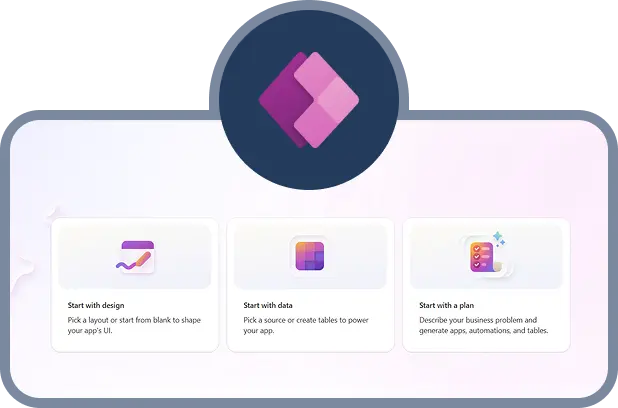
The Power Apps platform is Microsoft’s cloud-based low-code application platform that enables organizations to build, extend, and integrate secure business applications while maintaining enterprise-grade governance and security. Power Apps is part of the Microsoft Power Platform, which also includes Power Automate, Power BI, and Power Pages.
It allows teams across finance, operations, sales, and customer engagement to digitize processes, automate workflows, and connect enterprise data in one unified environment.
Built on Microsoft Azure and integrated with Microsoft 365, Dynamics 365, and AI capabilities such as Copilot, the Power Apps platform helps organizations innovate faster while maintaining enterprise-grade security, compliance, and governance.
Why organizations need the Power Apps platform
Many enterprises struggle with operational inefficiencies that slow growth and reduce profitability:

Manual spreadsheet-based processes that increase errors

Disconnected systems that prevent real-time insights

IT backlogs delaying digital initiatives

Siloed departmental data

High custom development costs

Limited automation across workflows

Growing compliance and governance requirements

Without a modern low-code solution, organizations face rising costs and reduced agility.
How the Power Apps platform solves these challenges
The Power Apps platform enables business users and IT teams to rapidly design, deploy, and scale applications across departments. This reduces IT backlogs while maintaining centralized governance, security controls, and architectural consistency.
Key solution advantages:
Rapid low-code app development
AI-powered app generation using Copilot
Seamless integration with Microsoft 365, Dynamics 365, Azure, and third-party systems
Built-in governance and enterprise-grade security
Scalable cloud infrastructure
Workflow automation through Power Automate
Unified app data management using Microsoft Dataverse
By leveraging the Power Apps platform, organizations can reduce development cycles and improve operational efficiency across functions.
Key capabilities and business outcomes from implementing Power Apps
Finance and operations
Features and capabilities:
Custom expense management apps, budget tracking dashboards, procurement and approval workflows, and ERP and accounting system integration
Business outcomes:
- Reduced manual processing times
- Faster approvals and compliance tracking
- Centralized financial visibility
Sales and customer engagement
Features and capabilities:
Mobile extensions for CRM, lead and pipeline tracking, self-service customer portals, and integration with Microsoft Dynamics 365 Sales
Business outcomes:
- Increased sales productivity
- Better customer response times
- Unified customer insights
Human Resources and workforce
Features and capabilities:
Employee onboarding portals, leave and attendance management, performance tracking, and integration with Microsoft Teams
Business outcomes:
- Faster onboarding cycles
- Reduced administrative work
- Better workforce analytics
Operations and field services
Features and capabilities:
Mobile inspection apps, maintenance scheduling tools, integration with Azure services and IoT data, and real-time field reporting.
Outcomes:
- Improved field visibility
- Faster issue resolution
- Reduced operational errors
Modules within the Power Apps platform
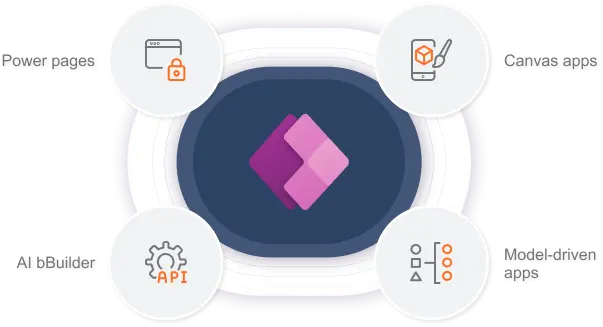
The Power Apps platform is designed as a modular low-code application development ecosystem, enabling organizations to build, extend, and scale business applications based on their specific needs. Each component works together to create a secure, integrated environment that connects data, automates processes, and delivers real-time insights across the enterprise.
Key modules and highlights:

Canvas apps
Drag-and-drop design tools to create mobile and web apps.

Model-driven apps
Data-first applications built on Dataverse, ideal for complex workflows.

Microsoft Dataverse
Centralizes structured business data with governance and security.

AI Builder
Adds AI capabilities such as document processing, predictions, and object detection.

Power Automate integration
Automates workflows across departments.

Power Pages
Creates secure external-facing websites for customers, vendors, or partners.

Connectors and integration services
Hundreds of prebuilt connectors to Microsoft 365, Dynamics 365, Azure, and third-party systems.

Benefits of adopting the Power Apps platform

Increased speed of application delivery

Improved operational efficiency

Enterprise-grade security and compliance

Seamless collaboration across Microsoft tools

Lower development costs

Higher return on investment

Client success stories with sa.global
PT. Mandiri Graha Persada
Result: Successfully implemented a unified Microsoft business applications suite including Microsoft Dynamics 365 Business Central, Microsoft Dynamics 365 Sales, and the Power Apps platform.
Impact: Improved operational visibility, enhanced cross-department collaboration, and scalable digital processes through an integrated cloud solution.
Discover how PT. Mandiri Graha Persada transformed operations with sa.global →
Licensing and pricing overview
Understanding Microsoft Power Apps pricing helps plan budgets and deployment:
- Per app plans for specific use-case deployments
- Per user plans for broader access
- Pay-as-you-go options
- Role-based access licensing
Licensing varies based on the number of users, applications, integrators, AI capabilities, and data capacity. A certified Power Apps partner can help optimize licensing and reduce costs.
Why partner with sa.global?
As a leading Microsoft business applications partner with decades of experience, sa.global consistently delivers solutions built on Microsoft’s secure cloud platform. sa.global has achieved Microsoft’s Inner Circle recognition multiple times, demonstrating its strong commitment to customer success and innovation across the Microsoft business applications ecosystem.
sa.global provides:

Microsoft-certified consultants and architects

Deep industry expertise across multiple sectors

Proven implementation frameworks and best practices

Governance, security, and support services

Ongoing optimization and managed services
Work with sa.global to ensure scalable, secure, and future-ready Power Apps implementation.
FAQs
Is the Power Apps platform suitable for large enterprises?
Yes. The Power Apps platform supports enterprise-grade governance, compliance, and scalable deployments, making it ideal for large organizations managing complex workflows.
How much does Microsoft Power Apps pricing cost?
Pricing depends on your plan: per app, per user, or pay-as-you-go. Licensing also varies based on app complexity, AI features, and Dataverse storage. A certified Power Apps partner can help optimize costs and select the right plan.
Can the Power Apps platform integrate with other business systems?
Yes. The platform includes hundreds of standard connectors and allows custom APIs to integrate with Microsoft 365, Dynamics 365, Azure, and third-party systems, ensuring seamless enterprise-wide connectivity.
How does AI enhance the Power Apps platform?
AI Builder and Copilot enable natural language app creation, predictive analytics, and intelligent automation, helping businesses create smarter applications faster without extensive coding.
Why should I work with a Power Apps partner?
A certified Power Apps partner ensures successful deployment, optimized licensing, and long-term support. Partners like sa.global provide Microsoft-certified consultants, governance frameworks, and managed services to maximize ROI.
How long does implementation take on the Power Apps platform?
Simple applications can be deployed in a few weeks, while comprehensive enterprise solutions may take several months, depending on complexity, integrations, and workflow automation needs.